A project management software from 1996 that I found on a bundled OEM PC from TIME. Lets take a look at what project management was like in 1996

The software was intended to be used on Windows 95 and 3.1, which was still in common use at the time of release. It was developed by SoftKey Multimedia, who were well known for their line of budget software that was typically sold as part of a bundle. SoftKey would later acquire MECC and software division of The Learning Company. If you’re not familiar with project Management software, it’s intended for professional project managers and larger organizations to handle complex projects (e.g., construction, IT development) with detailed scheduling and resource management.

Here we have a straightforward interface, leveraging the graphical capabilities of Windows 95 to provide a more accessible experience compared to earlier DOS-based and Windows 3.1 tools. It included built-in features for creating Gantt charts, a popular feature for visualizing project timelines, influenced by the historical development of project management software like the Harmonogram and Gantt charts which are very common for project management.

Typical features were that users could create and manage tasks, breaking down projects into smaller, actionable components. This included setting task names, descriptions, and priorities, a standard feature for project management tools of the time.
The Symbol/Connector Date Sensitive feature is one of the ways Project Manager Pro will let you show progress. This feature causes symbols and connectors to change after the current date line to indicate future activity. The date. For straight line connectors, the line pattern will change from solid to dash. You can define dependencies between tasks, ensuring that certain tasks could not start until others were completed, reflecting methodologies like the Critical Path Method.
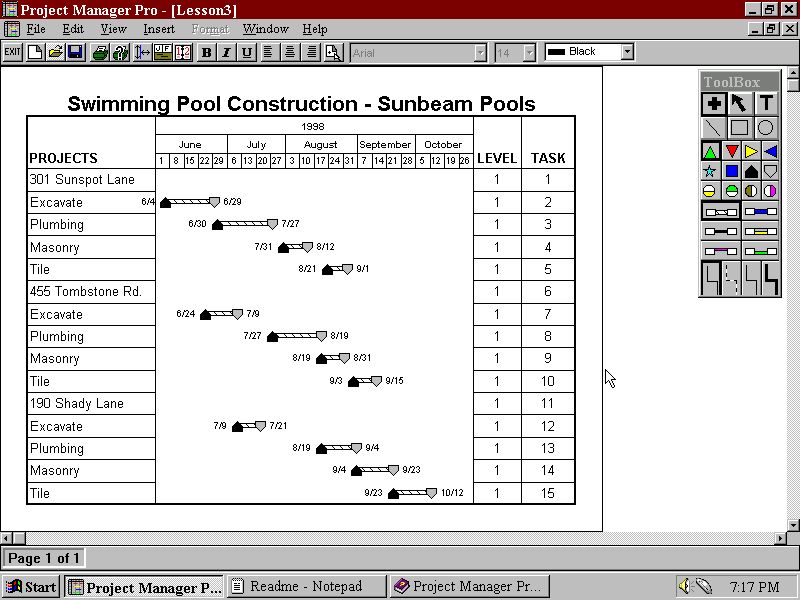
There is another way to show progress with Project Manager Pro. This is through the use your start and end date. Your start date is connected to the progress symbol and the progress symbol is connected to the end date.
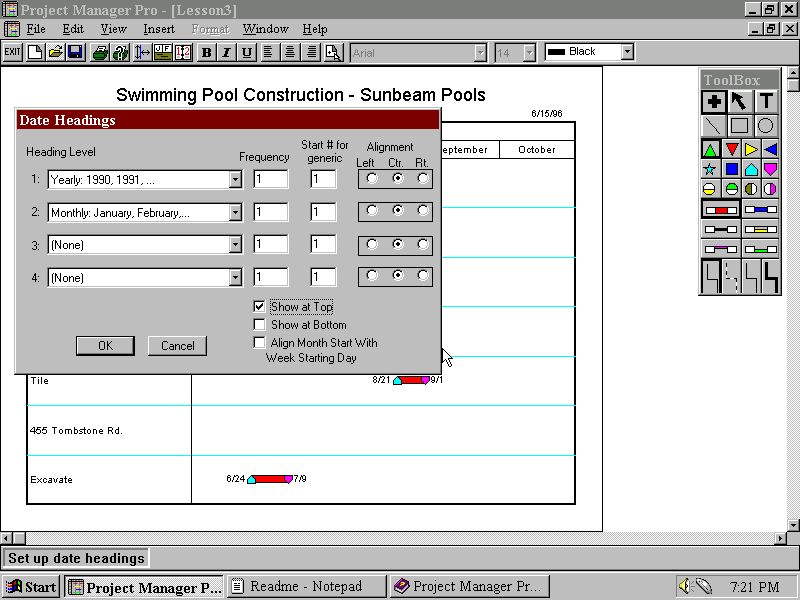
In comparison to Microsoft Project 4.1a which would have been released around the same period, Microsoft’s is a professional-grade tool with advanced scheduling, resource management, and scalability for complex projects, targeting enterprises and experienced users. Project Manager Pro is a simplified, budget-friendly option for small-scale projects, designed for ease of use by non-experts.
 Drew1440: Blog