Tag Archives: Qualcomm QSD8250

LG Optimus 7

The phone that introduced me to the world of Windows Phone

Released in 2010, the Optimus 7 is one of the first generation of Windows Phone 7 smartphones. As part of the first generation, its quite similar ins specifications to other Windows Phones of the time, with a single core Snapdragon processor running at 1Ghz, Adreno 200 graphics core and 512MB of RAM. For storage , it has 16GB onbord memory, but no expandable memory, a 3.8 inch screen and a 5 megapixel camera with a dedicated camera button.

This model was purchased back in 2011, originally unlocked from Expansys. Originally Running Windows Phone 7, it was alter upgraded with the NoDo update, followed by Mango and eventually the 7.8 update.

Windows Phone 7 had no screenshot support so images are captured by pointing a camera to the screen.

Bundled Apps

LG had bundled a few applications with the handset, which were available on the LG Apps Store section on the Marketplace. There were a few other apps that could be downloaded but have since been nixed by Microsoft. A few I can remember was a web and walk app, and a couple of Winnie apps that did nothing spectacular.
Since the phon was factory reset at some point (gave it to a relative after they managed another iPhone) meaning all the original apps have since been lost.

Network Setup

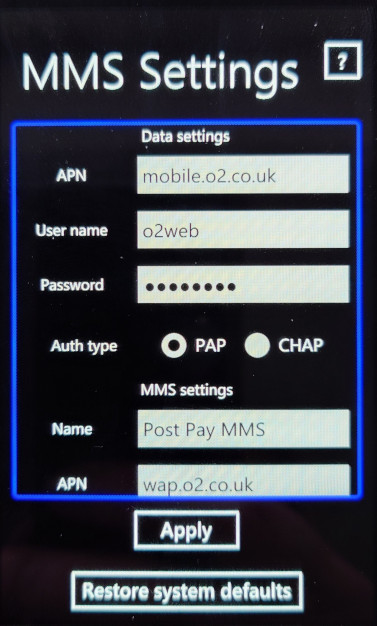
Used to setup the network operator, to install settings for the APN and MMS configuration. Usually this is dedicated automatically by the network operator but you can manually amend them using this utility.

ScanSearch

This would search for local buisness and point of interest by suing the Gps and the phones camera to scan for barcodes or items. Its sort of like an augmented reality application that displays businesses according to the camera. I guess it was useful if you were in an unknown location and needed to find a local shop. Either Bing or Google could be used to locate the information.

As you can guess, the network functionality is dead now.

PlayTo

A DLNA casting app that lets you share photos, music and video stored on the phone, which can then be displayed on any device that supports DLNA like a network connected TV, console (PS3) or Windows Media Player (11+). In this example it picked up my AV receiver (Yamaha RX-481D)
The app does warn that DRM protected content will not be shared, so no music purchased from the Zune store.

As screen mirroring or casting was not a common features in smartphones, setting up your phone as a DLNA server was an alternative workaround for displaying content on the big screen.

Panorama

A basic app that lets you take a panoramic photo, the app will guide you through the process of capturing a panoramic picture, which it will then stitch together.

MFG

A test application that used to access the phones registry, and to access developer related options. This can be accessed by entering ##634# into the phone dialler app, and then entering the password 277634#*# followed by pressing enter. You can also perform a few hardware tests for the touchscreen, camera, light and proximity sensors.

Dell Venue Pro

The first and last Dell Windows Phone

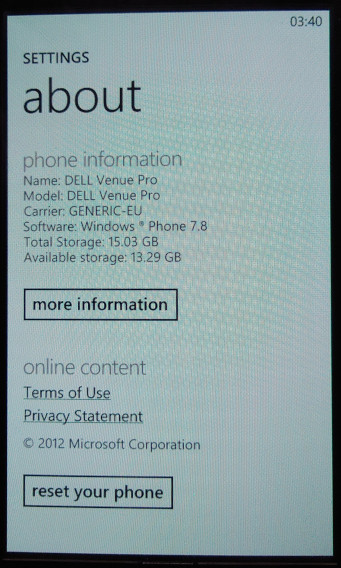
Dell was one of the launch manufacturers for Windows Phone, back when it launched in 2010. The Venue 7 stood out compared to the other models thanks to its slide form factor which is reminiscent of the old Samsung slide phones of the era. A gentle push will reveal the phone’s keyboard, which looks similar to a standard PC keyboard in terms of layout.

Aside from that, it’s pretty much the same compared to other Windows Phone 7 handsets with its 5-megapixel camera, Qualcomm Snapdragon 1GHz processor with an Adreno 200 graphics core, and 16GB onboard storage. No micro-SD support so storage cannot be expanded.

This would be Dell’s last foray into the mobile market, Dell also had a few Android handsets like the Dell Streak and would produce a few tablet devices like the Dell Venue.

This handset originally ran the launch builds of Windows Phone 7 and was later upgraded to 7.8 which backported various Windows Phone 8 features.

Microsoft has slowly phased support for Windows Phone 7, with various services ceasing support. Bing no longer works, the app store has since been discontinued meaning you can no longer download and install applications for the device, limiting its capabilities as a smartphone. You’re pretty much limited to what comes with the device, which is very little in this case. The handset has pretty much become a basic feature phone with web browsing functionality but with Internet Explorer 9 the browsing is very limited with certain sites refusing to load due to how old the browser is and the lack of support for modern security protocols.

As someone who use Windows Phone from 2011 – 2017, it’s a sad state to see how this once fantastic but flawed mobile OS has been abandoned, kind of like seeing how deteriorated the Titanic wreck is.
Some things still work as of October 2022, like the search suggestions that appear when you type into the Internet Explorer search bar, and the Bing background wallpaper.

The games will certainly be missed as Microsoft actually put some effort into porting popular titles like Doodle Jump and Fruit Ninja, and also embraced new titles like Beards n Beaks and Wordament. All of these feature Xbox Live achievements and leaderboards which synced with your main Xbox profile.

There are very few applications that are preinstalled, which Windows OEMs could do so. Considering this is a Dell, I’m surprised there no McAfree security preinstalled. The only one I can see is a network operation settings app, that lets you set the correct internet and MMS configuration for your network provider.

Music & Video

The Zune software is used to transfer media from and to the phone and is required for this purpose. You cannot use MTP to transfer content as the phones file system is not exposed to the host in any form. Its a very similar approach to what Apple took with the iPhone, where iTunes was the only way to exchange media to the phone. (Although later ios released supported PTP for easier photo transfers)

The problem here is Zune is partially broken on later Windows 10 releases since the conversion function is nonfunctional. This was useful for when you had high quality MP3 files that you wanted to transfer to the phone Zune could transcode them to a lower quality, say 128Kbps, and copy them to the phone. The result is a smaller file size in a more efficient WMA format whilst maintaining some form of quality.

Using Windows 8, 7 or Vista is recommended if you wish to transcode your music through Zune.

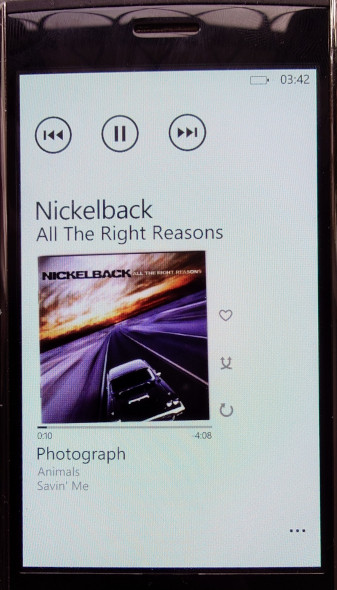
This does make the phone a kickass music player, and back when if was functional Zune pass was revolutionary for the time as it allowed you to subscribe to stream music from their library, similar to Spotify or Deezer today.

Lastly the Zune software could also sync podcasts and applications/games downloaded from the Zune store. This functionality has since been removed and has not been replicated, making it impossibly to load apps from your PC onto the phone itself.

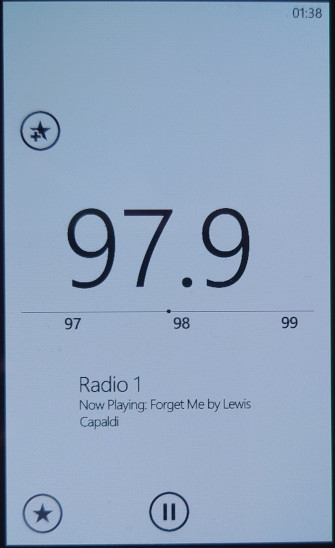
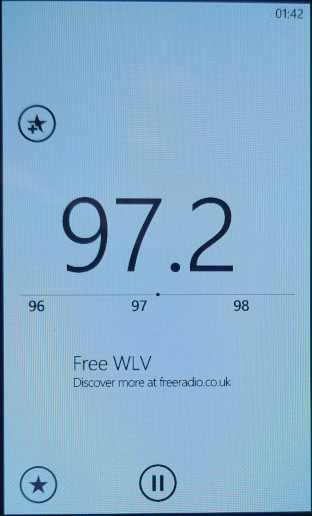
You at least get access to an FM radio, which lets you change the frequency by sliding your finger in the direction you want to scan. It can pick up station name indicators along with any supplementary information if broadcast by the station. You can also pin stations individually onto the start screen for quick access.

Conclusion

Well, it’s a shame to see that was once a smartphone has now been relegated to a feature phone, or even a dumb phone as compared to your typical Nokia or Sony Ericsson feature phone that has the ability to run third party Java programs, Windows Phone 7 now lacks this ability. Only merit it has is its Internet Explorer browser which is losing support by the day.