MusicMatch was one of the many media player applications that was geared towards the emerging Mp3 revolution. As Windows 98, one of the common operating systems of the era lacked built in MP3 support, it was necessary to install a third party application to facilitate MP3 playback and recording. MP3 players were also coming on the market, which required the use of a dedicated software package to manage them.

The MusicMatch installer, which later prompts you to register your email address
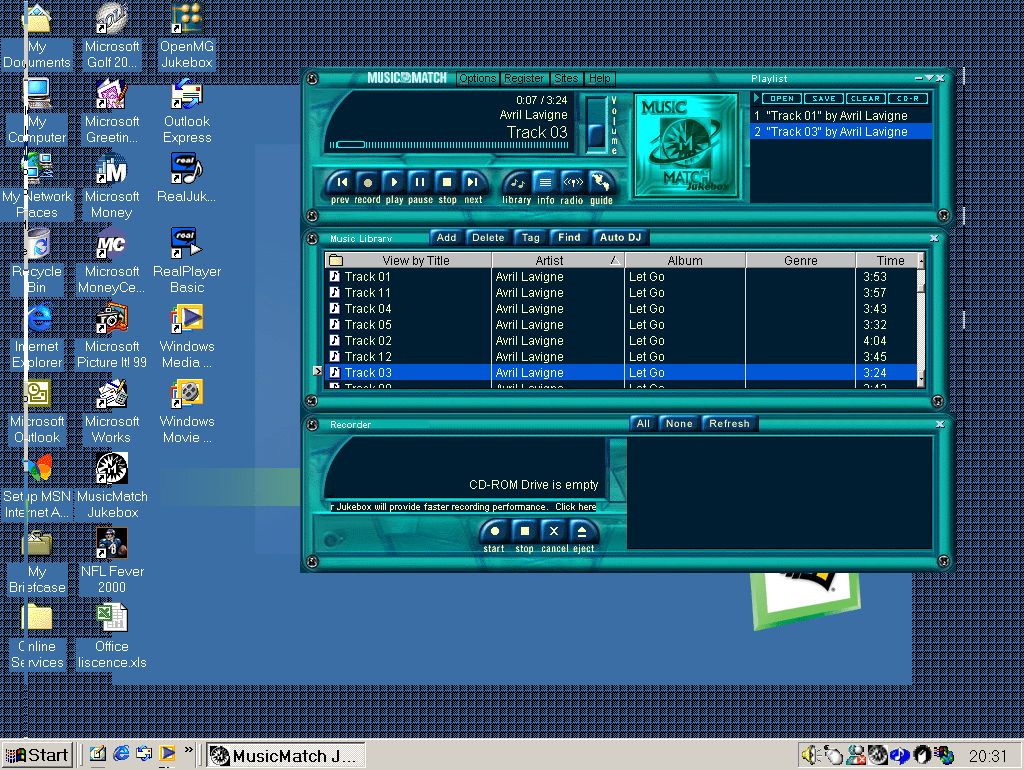
After the install, we are treated to a skeuomorphic-like interface that resemble a vintage hifi. Here we can see the software divide into several sections. The player section where we can control the music playback and the current playlist. The Music Library which shows the MP3 tracks we ‘recorded’ from our audio cd (or acquired online somehow). Towards the bottom there is the Recorder that lets you import music from an audio CD.

The interface isn’t your standard Windows design, and you cannot maximize the window which makes the program appear cluttered, especially when you have songs with long strings. There is a compact mode which is intended to show song information whilst you are multitasking with another program like a web browser.

The Recoding section is where we can import our audio CD’s into either the MP3/WAV or WMA format. This is also known as ‘Ripping’ as later applications referred to it. Recording could also refer to how they had to actually record the CD audio stream, as many early PC CD-ROM implementations didn’t send the CD audio over the IDE interface, instead using the analogue Cd audio that was connected to the sound card directly. Recording audio in this method was slow because it had to actually capture the audio in real-time, so an 80 minute CD took that long to record onto the hard disk. In contrast, MusicMatch supports digital audio where the audio data can be sent through the ide (And later SATA bus) for faster importing.

Musicmatch supported the used of a CDDB database to locate CD song titles. There are projects to help revive this functionality, however I was able to get MusicMatch to obtain the track listings. Possibly this is using a non-standard format or is hardcoded to use Musicmatch’s own servers. So for now we have to manually type this in. Conveniently you can set the artist and the album which will be applied to the songs in the album, but song titles will need to be added manually one by one.

Formats supported are MP3 and WMA, the latter being Windows media Audio. Audio quality is grouped by how relative it is to either FM and CD audio. Oddly it defined a 64k MP3 as the same as WMA, whilst the latter is supposed to be more efficient at lower bitrates. You can also manually set the bitrate, going as low as 8k for MP3 which sounds horrific. Unlike Windows Media Player and RealJukebox, Musicmatch does not have its own format, instead MP3 is the default supported codec.

Some of the quality options seem too low, but as many entry level MP3 players had shipped with only 32Mb of memory, having the option to encode files at a lower quality was useful for those concerned with disk space. You can also convert existing files, however reencoding and compressing MP3 files adds additional compression artifacts and is really intended for converting WAV audio.
There are also links and a built in browser to download and purchase MP3 files. This was during the emergence of piracy that was becoming widespread through out the media, so it was imperative for Musicmatch to focus and promote legal MP3 stores. But. DRM(Digital Rights Management) was compulsory for copyrighted Mp3 files, which affected how you could transfer and playback music to other portable devices. It was a dark era where record companies were trying to figure out how to distribute music online and is thankfully no longer the case.
Musicmatch also has a professional edition that you could purchase, this upgrade allows you to record music CD’s faster, jewel case printing and support for high quality bitrate.
Portable devices supported include the RCA Lyra, Creative Nomad and the Diamond Rio. You can sync individual track or an entire playlist. If you were lucky enough to have an CD-R drive you can also create traditional music CD or a Data CD using MP3 or WMA.


Lastly a preview of the included themes, Digital Age, Midnight Swin, Reverb and Titanium. Additional themes could be downloaded from the Internet.


I just wanted to know if you have any archived RealAudio files, that you can share with me here. So that is what you told me also, before. So can you share these RealAudio files with me then? And I just wanted to know also, if these RealAudio files are using rtsp:// servers.
So just let me know about this, and also keep me informed about this also. And also I just wanted to know about the RealAudio Take5 video, and I wanted to know if that can play in realplayer 7. Because I think I saw your realplayer basic was trying to play this back. And I saw a picture of that also, on your blog. All right, so just let me know if there is a way to make this play, if that’s possible.
All right, so please get back to me, whenever you’re not busy. And try to share these archived RealAudio files with me, then. So get back to me as soon as possible, then. So thank you very much.
LikeLike